SlidesAI Review 2026: Is This AI Presentation Maker Worth It?

SlidesAI turns text, notes, and documents into ready-to-use slides inside Google Slides and PowerPoint.
SlidesAI is one of the most practical AI presentation tools if you already live inside Google Slides or PowerPoint and want to stop wasting time formatting decks from scratch. It takes your notes, text, or rough ideas and turns them into a usable presentation draft fast, which is exactly what busy professionals, educators, and students need.
SlidesAI – Quick Overview
Type: AI presentation maker for Google Slides and PowerPoint.
Best for: Educators, consultants, students, marketers, and teams that need fast slide drafts.
Pricing: Free plan available, plus paid Pro and Premium plans.
Website: slidesai.io
Core features:
AI text-to-presentation generation.
Theme and layout customization.
Slide rewriting and text refinement.
AI image and stock image support.
Multilingual presentation creation.
PPTX export for sharing and editing.
PrimeProductiv4 Rating: ⭐️⭐️⭐️⭐️☆
What Is SlidesAI?
SlidesAI is an AI-powered presentation tool that helps you turn text into slides in minutes. Instead of starting from a blank deck and manually building every slide, you give it content and it creates a presentation structure for you.
That makes it especially useful for anyone who needs presentations regularly but does not want to spend hours designing them. It works inside Google Slides and also supports PowerPoint, so it fits into existing workflows instead of forcing you to switch platforms.
How SlidesAI Works
The process is simple. You paste in your text, topic, notes, or document content, and SlidesAI turns it into a slide outline and draft presentation.
From there, you can refine the wording, adjust the tone, change the layout, and add images. The real value is not that it replaces your judgment, but that it removes the blank-page problem and gets you to a working first draft much faster.
Key Features
AI Text-to-Slides
This is the main reason people use SlidesAI. It takes raw text and transforms it into structured slides with titles, bullet points, and clear sections.
If you have meeting notes, blog content, research, or a rough outline, SlidesAI can turn that into a presentation that feels organized instead of messy.
Templates and Layouts
SlidesAI includes a solid selection of themes and layouts, which helps your slides look more polished without requiring design skills. You can tweak styles, apply different formatting, and make the deck feel more on-brand.
That matters because AI-generated slides can look generic very quickly. SlidesAI gives you enough control to make the result feel more intentional and less automated.
Rewrite and Refine Tools
A lot of AI slide tools generate decent structure but clunky wording. SlidesAI helps fix that by letting you rewrite, shorten, or rephrase text directly inside the editor.
This is useful if you want the content to sound sharper, more concise, or more professional. It is especially handy for client-facing decks where sloppy wording is not an option.
Image Support
SlidesAI also lets you add AI-generated or stock images inside the workflow. That saves time because you do not have to jump between different apps just to make a presentation look less flat.
It is a small feature, but it makes a big difference when you need a deck that looks presentable fast.
Multilingual Support
SlidesAI supports multiple languages, which makes it a practical choice for international teams and multilingual users. If you work across markets or present to different audiences, that flexibility is genuinely useful.
Why SlidesAI Stands Out
SlidesAI is not trying to replace your presentation workflow. It is trying to speed it up.
That is why it works so well for people already using Google Slides or PowerPoint. You do not need to abandon your current system, and you do not need to learn an entirely new platform just to create a decent deck faster.
The strongest part of the tool is that it helps you get started. Once the first draft exists, the rest of the editing process becomes much easier.
Pricing
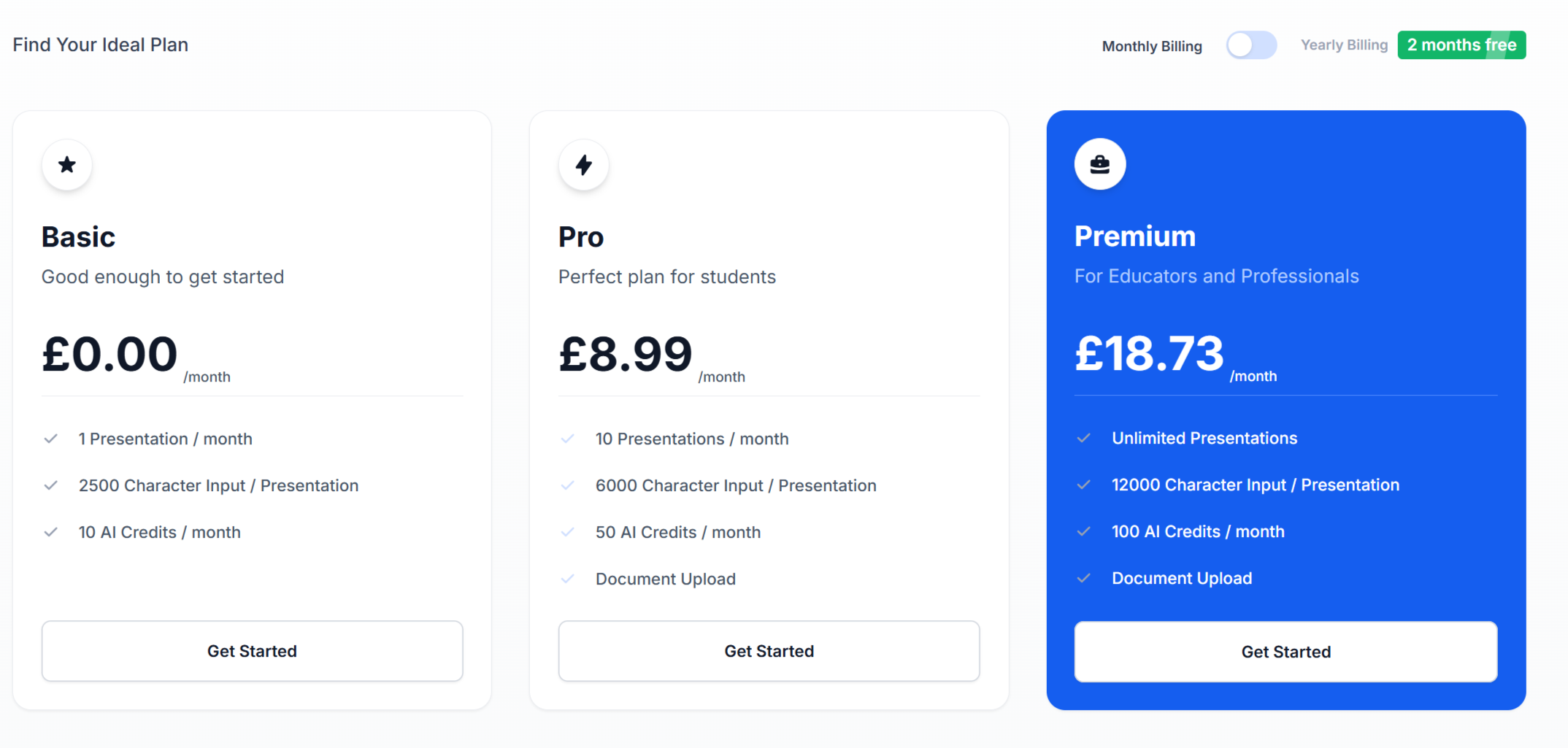
SlidesAI offers a free plan and paid tiers for heavier use.
Free Plan
The free plan is useful for testing the tool and creating a limited number of presentations. It is enough to see how the workflow feels, but not ideal if you create slides regularly.
Pro Plan
£8.99 pm (paid monthy) and £7.49 pm billed at £89.99/year
Premium Plan
£18.73 pm (paid monthly) and £15.61 billed at £187.34/year
Pros and Cons
👍 Pros
Very fast slide creation.
Easy to use inside Google Slides.
Good for turning text into a usable deck.
Strong time saver for repetitive presentations.
Useful templates and layout controls.
Helpful for teams, students, and consultants.
👎 Cons
Free plan is limited.
AI-generated content still needs editing.
Some slides can feel generic without manual refinement.
Not a full replacement for professional design work.
Best Use Cases
SlidesAI works best for:
Internal presentations.
Training decks.
Lecture notes and lessons.
Client updates.
Brainstorming decks.
Quick pitch drafts.
Turning documents into slide outlines.
If you need a polished presentation in a short amount of time, this tool can save a lot of effort.
Tools Comparison Table
| Tool | Best For | Strengths | Limitations |
|---|---|---|---|
| SlidesAI | Fast text-to-slides inside Google Slides or PowerPoint | Easy workflow, quick drafts, good for everyday presentations, affordable paid plans | Still needs editing, can feel generic, free plan is limited |
| Gamma | AI-native presentations with modern visuals | Strong design, polished output, good for standalone decks | Less tied to classic slide workflows, can feel more platform-specific |
| Beautiful.ai | Design-focused presentations | Clean layouts, strong visual consistency, good brand feel | Less flexible for users who want full manual control |
| Presentations.ai | Branded presentation creation | Good for business decks and structured workflows | May feel heavier than a simple add-on tool |
| Plus AI | AI slide creation in existing presentation tools | Useful for users who want AI inside familiar software | Can be more advanced than casual users need |
Who Should Use SlidesAI?
SlidesAI is a strong fit for people who already use Google Slides or PowerPoint and want to work faster. It is especially useful for educators, consultants, marketers, students, and business teams that create repeat presentations.
If your biggest problem is not having ideas but spending too much time formatting them, SlidesAI is built for you.
Is SlidesAI Worth It?
Yes, if your goal is speed, structure, and convenience.
SlidesAI is not the most advanced presentation platform on the market, but it is one of the most practical. It helps you get from idea to draft quickly, which is often the hardest part of making slides.
For people who value efficiency over perfection, it is absolutely worth testing.
Discover Your Ideal Productivity App
Take this quick 3-question quiz to find the productivity tool that matches your work style perfectly.
Try the Quiz Now
FAQs
1. What is SlidesAI used for?
SlidesAI is used to turn text, notes, or documents into presentation slides quickly. It helps users create slide decks without building everything manually.
2. Does SlidesAI work with Google Slides?
Yes, SlidesAI works directly inside Google Slides as an add-on, which makes it easy to use in an existing workflow.
3. Does SlidesAI work with PowerPoint?
Yes, SlidesAI also supports PowerPoint, so users can create and edit presentations in more than one platform.
4. Is there a free version of SlidesAI?
Yes, SlidesAI offers a free plan with limited usage so you can try the tool before upgrading.
5. Can I edit the slides after SlidesAI generates them?
Yes, you can edit the slides after they are generated. You can change the text, layout, visuals, and structure just like a normal presentation.
6. Is SlidesAI good for students and teachers?
Yes, it is especially useful for students and teachers because it saves time when turning lessons, notes, or assignments into slides.
7. Is SlidesAI worth paying for?
If you create presentations regularly, yes. The paid plans make sense for anyone who wants to save time and produce slides faster with less manual work.
Final Verdict
SlidesAI is a smart choice for anyone who wants faster presentations without giving up Google Slides or PowerPoint. It is quick, practical, and easy to fit into an existing workflow.
It will not magically replace good thinking or strong presentation skills, but it will save you time and help you get to a solid first draft much faster. For busy professionals, that is the real win.
Get Started
Last Updated: July 2026
Category: AI-Powered
