Maximize Your Productivity with Calendarly Lock Screen App
Calendarly app logo – lock screen calendar productivity tool for iPhone users.
Best For: iPhone users who live in Apple Calendar and want their schedule always visible, people with ADHD or brain fog who forget what’s next, busy professionals and students trying to reduce “just checking” unlocks, and anyone who wants a calmer, more intentional relationship with their phone.
Category: Focus & Productivity, Calendar & Scheduling (iOS)
Website: https://getcalendarly.com
What is Calendarly?
Calendarly is a minimalist Lock Screen calendar app that turns your iPhone wallpaper into a live calendar view, so your schedule is visible the moment you tap the screen—no apps to open, no widgets to manage, no swiping around.
Instead of acting as a separate calendar, it connects to your existing Apple Calendar and continuously generates a wallpaper that shows today’s events, upcoming plans, and important dates right where you look first.
Where most productivity apps add more screens and dashboards, Calendarly aims to remove friction: you simply glance at your Lock Screen and you instantly know what’s next.
How Calendarly Works
Calendarly runs as a small iOS app plus an Apple Shortcuts automation that keeps your Lock Screen wallpaper up to date in the background.
You choose the calendar sources (Apple Calendar accounts) you want to display.
You pick a layout style: daily view, upcoming agenda, or a more traditional calendar grid depending on how you like to see your time.
Calendarly then uses Shortcuts to periodically regenerate your Lock Screen wallpaper with the latest events, so your schedule refreshes automatically without you doing anything.
Once set up, it works offline as well—your schedule remains visible on the Lock Screen even without an internet connection, since everything is stored and rendered on-device.
In practice, it feels less like “using an app” and more like upgrading how your iPhone itself represents your day.
Key Features
Lock Screen calendar wallpaper – Your real Apple Calendar events are rendered directly onto your Lock Screen as a live wallpaper, so you see today’s schedule, upcoming events, and key dates at a glance.
Automatic background updates with Shortcuts – Calendarly uses Apple Shortcuts automations to update your lock screen calendar automatically, quietly in the background, so you never have to manually refresh.
Multiple layout options – Choose from different layouts (e.g., agenda-style list of upcoming events or a compact monthly calendar) to match how your brain prefers to view time.
Deep Apple Calendar integration – Pulls from your existing Apple Calendar accounts, so there’s no new system to learn or data to migrate.
Works offline – After setup, your Lock Screen calendar continues to display your schedule even when you’re offline, making it reliable for travel, low-signal areas, or intentional offline days.
Privacy-first, on-device processing – All calendar data stays on your iPhone; Calendarly does not send events to external servers, doesn’t require an account, and doesn’t track usage.
Customizable appearance – Adjust fonts, colours, and styles so your Lock Screen calendar matches your wallpaper aesthetic while remaining readable at a glance.
Minimal notifications and distractions – The core value is visual awareness, not interruptions; Calendarly doesn’t try to become yet another notification feed.
👍 Pros
Reduces “just checking” unlocks by making your schedule visible without opening any app, helping lower mindless screen time.
Very low friction once configured: the automation keeps things updated in the background with no ongoing effort.
Strong privacy posture with all processing on-device and no account requirements, ideal for users wary of sending calendar data to third parties.
Simple, focused product with a single clear job: show your calendar on the Lock Screen as cleanly as possible.
Pairs well with other productivity tools like Motion, Reclaim, or Sunsama by making their scheduled plans more visible throughout the day.
Works entirely within the Apple ecosystem, which makes it feel native for iPhone users already living in Apple Calendar.
👎 Cons
iPhone-only: no Android, iPad, or desktop version, so it’s not ideal for cross-platform teams or users who frequently switch devices.
Requires basic comfort with Apple Shortcuts during setup, which can feel intimidating to less technical users.
It doesn’t manage events itself—there’s no in-app event editing or advanced calendar features; you still need Apple Calendar (or another primary calendar app) for actual scheduling.
Limited to what a wallpaper can show; very dense schedules can look cramped compared to a full calendar app.
Currently lacks deep integrations beyond Apple Calendar, so users heavily invested in Google Calendar-only workflows may need extra setup or sync layers.
Pricing
Calendarly is listed as Freemium on the App Store at the time of writing.
Calendarly is free to download with optional yearly subscriptions and one‑time lifetime upgrades available via in‑app purchase. Pricing on the App Store currently ranges from roughly £9.99–£34.99 depending on plan, so always double‑check the latest options in the App Store before buying.
Best Use Cases
You frequently unlock your phone “just to see what’s next” and end up distracted by other apps.
You struggle with time blindness, ADHD, or fatigue and benefit from having your day’s structure literally in front of you every time you glance at your phone.
You already use Motion, Reclaim, or Apple Calendar as your main planner and simply want a better way to see the plan without opening anything.
You want to reduce notification noise but still stay aware of commitments and appointments.
You prefer lightweight, single-purpose tools that enhance your existing workflow instead of replacing it.
Who Calendarly is Best For
Calendarly is best for iPhone-first users who want ambient awareness of their schedule without yet another app to open or dashboard to maintain.
It’s especially helpful for remote workers, students, neurodivergent users, and busy professionals who benefit from visual cues and want fewer excuses to open distracting apps during the day.
If you already have a strong calendar setup but still find yourself forgetting what’s next—or constantly unlocking your phone to check—Calendarly is a simple, low-friction upgrade that makes your time visible where it matters most: your Lock Screen.
Alternatives
Here are a few alternatives or complementary tools you already feature on PrimeProductiv4 that pair well with Calendarly rather than replace it:
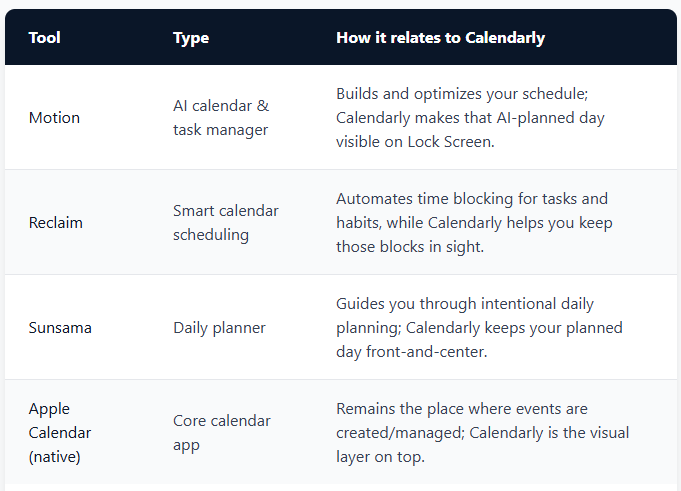
Icons for Motion, Reclaim.ai, Sunsama, and Apple Calendar shown together as alternative calendar and planning apps that work well with Calendarly.
Final Verdict
Calendarly is a focused, privacy-conscious Lock Screen calendar tool that fits naturally into a modern productivity stack rather than trying to replace it.
For PrimeProductiv4, it makes sense to position it as a Focus & Productivity / Calendar & Scheduling (iOS) app that helps users see and stick to their plans with less effort and fewer distractions.
7 FAQs for Calendarly (Lock Screen Calendar)
What is Calendarly and how does it work?
Calendarly is an iPhone app that turns your calendar into a live Lock Screen wallpaper, updating automatically in the background using Apple Shortcuts so your schedule is always visible at a glance.
Does Calendarly replace my existing calendar app?
No, Calendarly does not replace your calendar; it reads from your existing Apple Calendar accounts and simply displays your events as a Lock Screen calendar wallpaper, while you continue creating and editing events in your usual calendar app.
Is Calendarly private and secure?
Yes, Calendarly is designed to be private by default: it processes your calendar data on-device, requires no account or cloud sync, and does not track your usage or send your events to external servers.
Does Calendarly work offline?
Yes, once Calendarly is set up, your Lock Screen calendar continues to display your schedule even when you are offline, because the wallpaper and event data are stored locally on your iPhone.
Can I customize how the Lock Screen calendar looks?
You can choose from different calendar views (such as daily, monthly, or year‑style layouts) and adjust elements like colours and spacing so the calendar matches your style while staying easy to read.
Is Calendarly free to use?
Calendarly is free to download, with optional yearly subscriptions and one-time lifetime upgrades available as in-app purchases. Pricing on the App Store currently ranges from roughly £9.99–£34.99 depending on plan, so it is best to double-check the latest options directly in the App Store before buying.
Who is Calendarly best suited for?
Calendarly is ideal for iPhone users who rely on Apple Calendar and want constant, low‑friction awareness of their schedule—especially people with busy days, ADHD or time blindness, and anyone trying to reduce “just checking” unlocks that lead to distractions.
Ready to make your schedule impossible to ignore?
If you’re already planning your days in Apple Calendar, Motion, Reclaim, or Sunsama, Calendarly is a simple way to keep those plans front‑and‑centre on your iPhone Lock Screen so you actually follow through.
Head to the App Store, install Calendarly, set up your first Lock Screen calendar, and test it for a week—notice how often a quick glance at your phone is enough to keep you on track without opening any apps.
You can also combine Calendarly with:
Motion for AI‑scheduled tasks and meetings.
Reclaim.ai for smart time blocking and habits.
Sunsama for intentional daily planning and realistic workloads.
Together, they create a calmer, more visual system where your most important plans are always visible, not buried in tabs.
Get Started
Last Updated: March 2026
Category: Focus & Productivity, Calendar & Scheduling (iOS)
